Turn hours of running your business into minutes of talking.
Unmanually is a 24/7 AI executive assistant you run by voice from your phone.
Tell your Coordinator what you need from the van, the job site or between rooms. A team of AI agents handles the email, calls, calendar, quotes and follow-ups, and it remembers every promise and price.
- It remembers what you forget “What did I promise the Hendersons?” A revised quote by Friday, a site visit Tuesday at 10 — answered from your own files, never guessed.
- It runs the team for you A workforce of agents on your org chart, many jobs at once. You talk to one. It checks every agent’s work and only interrupts you when something is off.
- Nothing goes further than you allow Cost stated before anything runs. A hard spend limit per agent. An undo window on everything outbound. One word stops every agent.
Your business doesn't wait for you to get back to your desk.
A dashboard asks you to stop running your business in order to check on it. Your Coordinator doesn't. It runs your departments, keeps every agent on task, and tells you what needs you — in the van, on a job, between rooms. Press play. (Yours answers to whatever you name it.)
- 3× faster inSpeech beat a phone keyboard 3.0× — 161 words a minute against 53 — with 20% fewer errors, not more. Stanford, University of Washington and Baidu, 32 people.
- 23 minutes backThat's the average time to refocus after one interruption. Most people touch a task for 11 minutes before switching away from it, so they never reach full focus at all.
- ~2 hours a dayThe refocus tax on a normal day of 8–10 interruptions. Context switching eats up to 40% of productive time before anyone has done any work.
People will tell you reading is faster than listening. On one document, it is. But your day isn't one document — it's six dashboards, and remembering where you left off in each of them. One briefing collapses six context switches into one. That's the hours, and it's why it speaks when your hands are busy and shows you the detail when you're at a desk.
An AI that works like you, and gives one person superpowers.
Spoken, not typed. The kind of exchange you have from the car.
Live voice
A real conversation, hands-free. Cut in and it stops to listen.
LiveDocument vault
Ask for the one clause, price or promise instead of hunting for it.
LiveInbox, calendar, texts
Reads, drafts, replies and books across your connected accounts.
LiveSocial posting
Posts on your schedule, to your accounts.
Rolling outInvoices, e-signature, shipping
Through your own Stripe, signature and shipping accounts.
LiveSecure browser
No API? It uses the site the way you would, in an isolated session.
LiveCreative studio
Images and video made in-house, capped before anything is spent.
LiveThe mobile app
Talk, approve and redirect the whole business from your phone.
At launchPhone calls
Answers and calls out on your behalf, the way an assistant would.
Live Oct 15Purchasing and ads
Orders supplies and runs campaigns inside the budget you set.
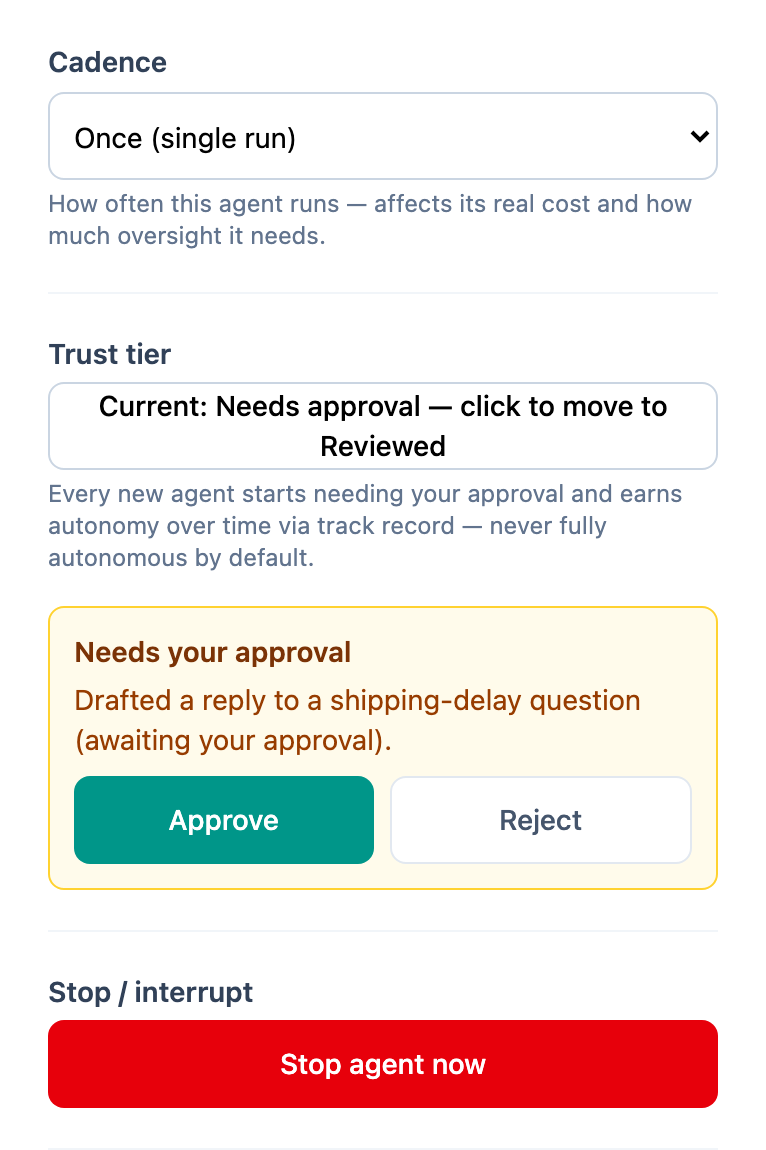
Rolling outThis is the actual product, running
Screenshots taken from the live builder tonight, not illustrations of what it might look like one day. Same teal, same buttons, same org chart you get when you sign in.

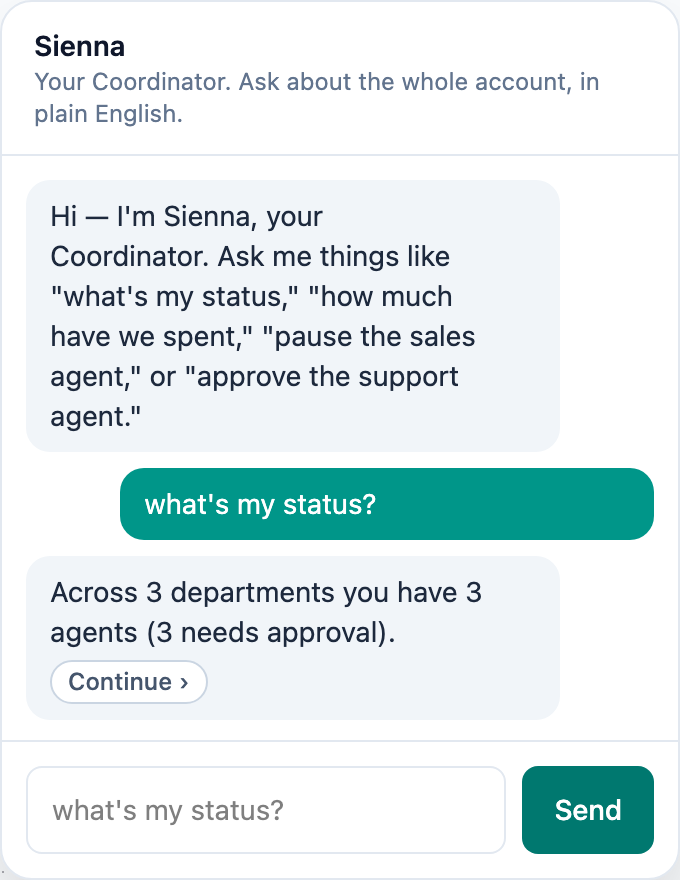
Three things, and only one of them is urgent.
The support agent drafted a reply about a shipping delay and wants your sign-off. Scheduling wants to move a Thursday job and the customer has already agreed. Neither is on fire.
The one I would look at: a quote for $8,400 has been sitting eleven days with no reply, and that is over your approval line so I have not chased it. Want me to?
Example answer from a demo account. Yours answers from your own account.
You describe the outcome. The infrastructure is already there.
Every other AI tool hands you a blank canvas and calls it power. What it actually hands you is a second job: picking models, wiring steps, watching for drift, rebuilding the whole thing when something changes underneath it. Tell your Coordinator what you want instead. The layer that makes it run properly is already built, and keeping it running is our job, not yours.
You say it. It builds it.
That one sentence is the configuration. Your Coordinator chooses the agents, the order they run in, what each may do on its own and what comes to you first — then shows you the plan before anything runs. No canvas, no nodes, no weekend.
The optimization layer sits underneath
Routing each step to the cheapest model that can actually do it, caching what repeats, retrying what fails, and refusing spend before it happens. You never watch it work. You see it in the invoice, and in the fact that nothing quietly broke.
It keeps working when the ground moves
Models get deprecated, prices change, providers have bad days. That is our maintenance window, not your Saturday. What you described on day one is still what happens on day two hundred.
Right now a quote sits an average of four days before anyone chases it, and about one in five never gets chased at all.
I’d stand up one agent that watches for quotes with no reply after 72 hours, sends the follow-up in your wording, and books the call if they answer. Anything above $5,000 comes to you before it goes out.
That’s roughly 30 credits a month at your volume. Want me to build it and show you the first three before they send?
Example answer from a demo account. Yours answers from your own account.
Simple on purpose
Three steps, and the only one you do is the first.
Tell your Coordinator what you want handled
Out loud in the van, or typed at a desk. Plain words — “stop letting quotes go cold”, “nobody should have to ask me twice about an invoice”. No fields, no flowchart. Your 1:1 setup call is included and booked right after checkout.
It shows you the plan before it runs
Which agents it’s standing up, what each one may do on its own, what has to come to you first, and what it will cost a month. You change anything you don’t like. Nothing runs until you say so.
It runs it and reports back
“Here’s what I did today.” Anything above your line waits for you instead of guessing. You correct it once and it keeps the correction — that is the whole management overhead.

Then don’t start with a list. Start with last week.
Tell me the thing you did more than twice that you resented doing, and the thing you meant to do and forgot. Those two sentences are usually enough for me to propose the first agent.
Most owners land on the same one: following up. It’s the work that never feels urgent enough to do today and is the most expensive thing to skip.
Example answer from a demo account. Yours answers from your own account.
Would rather not do even step one? Do It For Me — we sit down with you, build the whole thing, and hand it over running.
It’s not about “AI.” It’s what happens after the task disappears.
A reminder never fixed a staffing problem — somebody still has to read it and act. Follow the chain instead: the task an agent actually takes over, what that changes on a Tuesday, and where it shows up in money or in your own evening. Illustrative examples of the mechanism, not claims about a specific customer’s results.
Actually following up with tenants — maintenance, renewals, late notices — not reminding a human to do it.
Follow-up happens the same day, every day, instead of whenever somebody finds an hour.
Faster resolution keeps tenants, and the freed-up hours let the company take on more buildings without a new hire. Growth, not just savings.
Routine calls — booking, rescheduling, “where is my tech” — so they stop pulling people off paying jobs.
Fewer missed calls, faster bookings, and staff stay on billable work instead of the handset.
A missed call is missed revenue, recovered directly. More billable hours per person is profit per employee going up.
Triaging inbound client mail, drafting the routine replies, flagging only what needs real judgment.
Response time drops from hours to minutes, and the owner’s hours go to the work only they can do.
Answering first wins deals that would have gone to whoever answered first. The hours back are evenings, not a metric.
You’re a six-van service company, so the middle one — but your bottleneck is different from theirs.
They were losing calls. You’re losing the second call: the one where someone rings back to ask when the tech is coming, and nobody picks up because everyone is on a job.
Want me to sketch what that chain looks like with your numbers?
Example answer from a demo account. Yours answers from your own account.
Enterprise-grade, not enterprise-only.
One person or two hundred, it’s the same idea: every human gets their own Coordinator. Think of it as a double of you in the org chart — a version of you that holds the detail, so your head doesn’t have to.
Solo, and the business is you
You are the sales team, the scheduler and the accounts department, usually in the same hour. Your Coordinator takes the three of those you hate and leaves you the one you’re good at.
One seat. One Coordinator. Everything runs through it.A small team, and one brilliant person who hates software
Every owner has them: the best biller in the building, thirty years of relationships, and a CRM they have never once opened. They don’t learn your software. They talk to their Coordinator, and their Coordinator uses it.
Your best people stop losing to your tooling.An organization, at every level
Rep, analyst, manager, VP — each with their own Coordinator, each reporting up the chain that already exists. People stop chasing each other for status because their Coordinators already have it. The interface between two humans becomes something that prepares them both.
Same permissions, same reporting lines, same org chart.Everyone who needs one gets a seat, and a seat means their own Coordinator — not a shared chatbot with your name on it.
Mine knows what you care about and what you’ve already decided. Theirs knows their patch. When your ops lead needs your sign-off, her Coordinator packages it and mine brings it to you with the context already attached.
Every seat draws from the same account credits, and you see the split.
Example answer from a demo account. Yours answers from your own account.
We ship the features. And the structure underneath them.
You get the agents, the skills and the integrations you would expect from any serious platform — that part is table stakes and we build it. What you also get is the part nobody hands you: somewhere for those agents to live, somebody supervising them, and an account that cannot run away from you. Features are why you sign up. Structure is why it still works in month six.
Your agents are an org chart
Departments, sub-departments, and the agents inside them — laid out the way you already think about your business. When we reviewed the major automation platforms in September 2026, they gave you a flat list or a flowchart and left you holding the structure in your head. Any of them could draw an org chart tomorrow. What takes longer is everything that has to hang off it — the two cards beside this one.
Every agent has a trust level
You decide, per agent, what it may do on its own and what has to come to you first. Not a global on/off switch you end up regretting. Your Coordinator works to the same matrix — it acts inside it, reports what it did, and brings you anything above the line. Promote an agent when it earns it.
You don’t tune it. We do.
The optimization layer is ours to maintain, not homework we hand you. You should be running a business, not tuning prompts, watching for drift, or rebuilding a workflow because a model changed underneath it.
Three people, and only one of them without asking.
You approve anything. Your ops lead can approve up to $500 on her own — above that it routes to you. Your new coordinator can approve nothing yet; everything it does comes to one of you first.
Every agent inherits the trust level of whoever set it up, and I can’t go above the person who asked me. Want me to show you the four things waiting for approval right now?
Example answer from a demo account. Yours answers from your own account.
Every agent can act. None goes further than you allow.
You set how tightly each agent is held, and your Coordinator watches so you don’t have to. Autonomy is earned per agent, and enforced in the executor, not written in a policy document.
Priced before it runs
Every job states its cost before you say yes — per task, and by cadence for work that repeats. Ask “what would it cost to make it, post it daily and run ads behind it?” and each part is priced against what your month has left.
A hard limit per agent
Per day, week, month or year. Work that would take an agent over it is refused before a cent is spent — and you are warned at 80%, not at 100%.
An undo window on everything outbound
Approved emails, texts and invoices wait before they leave. Flag anything you want a closer eye on — a payment, a client email — and it always waits for you, with five minutes to change your mind.
- Only your voice approves
- One word stops every agent
- Hard spend limit per agent
- Undo window on everything outbound
- Every action recorded and replayable
- Hardened against hidden instructions in documents
Works with the tools you already use.
Your agents work through the accounts you already have — your inbox, your books, your number. Anything with a login and no connection yet works through the secure browser, with your approval.
See all 56, including what is coming
Calendar
Payments and invoices
Bookkeeping and accounting
CRM and field service
Phone and text
Social media
Business profiles and reviews
Advertising
Stores and websites
Suppliers and purchasing
Shipping
Documents and e-signature
Team chat
Bold: live today. Grey: being built or on the list. Need one that is not here? Ask your Coordinator — it goes on the list.
Ask what it costs before you spend it.
Metered billing is normal in this category and we use it too — your plan is a pool of credits. So this is not a claim that we found a way around the meter. Across the platforms we reviewed in September 2026 the complaint was never that credits exist; it was always the same sentence: I couldn’t tell what anything cost until after I had spent it. The thing we fixed is not the meter. It is that you can see it coming.
Your plan is a single credit balance. Talking to your Coordinator, an agent chasing an invoice, a call answered at 9pm — all the same pot. Nothing is set aside, nothing is reserved off the top, so there is nothing to discover in month two.
Not every action is the same size, so we don’t pretend it is. Cheap work costs fewer credits than expensive work. Nobody subsidises anybody, and your rate never depends on what your neighbour does.
“What would it cost me to chase every unanswered quote?” — and “is that worth doing?” Your Coordinator estimates before anything runs, and will tell you when something is not worth the credits. The calculator is not a page you go and find; it is a question you ask.
A hard stop inside the billing engine, checked against projected spend before the charge — not an email that arrives the day after. And when you’re close, topping up is a button, not a support ticket.
Not just what you’ve spent — what you’re spending, per day, and the date you’ll run out if nothing changes. Ask your Coordinator any time, in the van, without opening anything.
Add a colleague and you can see their burn on its own line from day one. Adding somebody to the team is never an unknown draw on your balance — which is the only honest answer to “what happens if I put my office manager on this?”
You’re 61% through this month’s credits with 11 days to go. Burn rate is steady at about 2.9% a day, so you’ll land around 93% — inside the plan, no top-up needed.
Do you want the total, or where most of it is going?
“Calls are the big one, and they’re worth it — that 41% booked 34 jobs. Want me to show you the same split for last month so you can see the trend?”
Example answer from a demo account. Ask out loud or type it — it answers either way, and draws the chart if you’re at a screen.
A cap stops a disaster. A forecast removes the anxiety. But the point is not that you stop worrying — it is that you can work the numbers out in advance, the same way you would for anything else you buy. Scale it in, budget for it like any other line item, and never have to ration your own software.
Lock in founding pricing before it's gone
Annual founding pricing, locked in forever — compared against what you'd pay a comparable AI-cofounder platform today.
Illustrative pricing — exact numbers are still being finalized against real inference-cost data. Every founding-100 price shown will always match or beat the comparison price on real capacity, never just a smaller number.
You’re charged in the currency shown here — no surprises at checkout.
We'll make it right
If something isn't working for your business, contact us and we'll work with you to make it right.
First 100 annual presale members lock in this price forever. After that, founding pricing closes for good.
Founding members also get priority support: your questions jump the queue.
Ready to stop doing this manually?
Leave your email and we'll reach out to learn what's eating your team's time.
No spam. We'll only reach out about Unmanually.